- UID
- 20
- Online time
- Hours
- Posts
- Reg time
- 24-8-2017
- Last login
- 1-1-1970
|
The best thing about Android is how customizable it is. Not everyone likes the default actions assigned to certain buttons or button combinations, and one of the most common complaints is with the home button on the older Samsung Galaxy devices. It is possible to make the home button do what you want, rather than what the manufacturer decided, using the following workaround.
*. How to customize Android
*. Best Android launchers
Samsung, along with many other manufacturers, are leaving the home button by the wayside as the ever-increasing displays gobble up more and more of the smartphone's front panel. The stylish Samsung Galaxy S8was the first flagship from the Korean company to ditch it, and now even lower-range devices such as the next Galaxy A8will follow suit. Nonetheless, the physical home button still has its fans, and we'll show you how to get the most out of it.
For demonstration purposes, we're using a Samsung Galaxy S7 on Android Nougat, although it should work on most phones that have a physical home button. By default, a double-tap of the S7 home button takes you to the camera shortcut but, for the purposes of this tutorial, we want to make it launch the Play Store instead. On older Galaxy devices, a single tap of the physical home button will bring you to your home screen, a double-tap launches S Voice, and long-press launch Google Now with a long press.
First, you’ll need a specialized app from the Google Play Store, so download and install it on your device. There are several apps that provide the same functionality, but for this example, we’re using Button Mapper: Remap your keys.

Button Mapper: Remap your keys
How to change the home button action
*.When you fire up Button Mapper, it will first advise you to authorize the app in yourSettings. Button Mapper will be able to see which app is currently on your screen. While this isn't unusual for an app with these capabilities, just be warned. We recommend you look up the developer of these apps to check for legitimacy.
*.After authorization, we'll be able to reprogram the physical Home and Volume buttons for different actions (additional options require a paid version). In this example, we’ll customize what happens with a double-tap.
*.Remapping a button is a four-step process. First select the Home Button to see a menu of customization options. SelectDouble Tap.
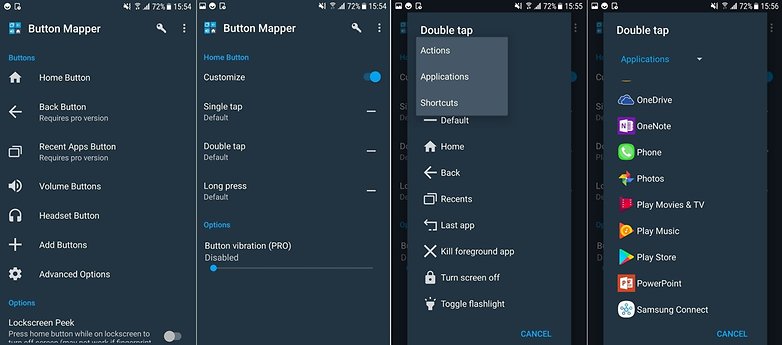
Even with the free version can be a life-changer. / © AndroidPIT
*.Next, choose whether you want to map the double tap to an action, application or shortcut. We choseApplications in this example.
*.Then we're presented with a list of applications. Select Play Store and voila! Double tapping the Home Button now opens leads to Google's market of apps and games.
*.If you ever want to go back to how it was before, you can clear your app defaults inSettings.
*.We actually think that the way the S7 launches the camera from a double-tap of the home button is a really useful feature, so If you have an older Galaxy device, you can use Button Mapper to make the double-press a camera shortcut rather than an S Voice shortcut.
*. Best custom ROMs for Android
*. Best root apps for Android
Happy customizing! What other cool modifications have you made to your Galaxy? Tell us about them in the comments.
Source |
|
 |
|  |
|  |
|
 العربية
 Deutsch
 Español
 Français
 한국어
한국어 |
|




 Post time: 14-2-2018 07:28:23